
The quality of PCBA (Printed Circuit Board Assembly) design directly impacts the production efficiency, manufacturing yield, and rework rate of electronic products.
To improve manufacturing yield, it is important to upgrade manufacturing equipment.
Refining manufacturing processes is also necessary.
In addition, designers must consider manufacturability and testability. This applies to both PCB design and PCB assembly.
This article focuses on how to design PCBA assemblies that are both manufacturable and testable.
Design for Assembling and Testing of PCBA
Design for assembling and testing of PCBA encompasses two aspects: PCB design and PCBA process design.
A well-designed PCBA should enable efficient assembly, high yield rates, and convenient testing.
This article analyzes these two aspects—PCB design and PCBA process design—to explore the essential elements and key considerations of effective PCBA design.
PCB Design
Physical Design
Designers prefer rectangular PCBs for their appearance.
Considering factors such as thermal deformation during the soldering process and structural strength, they commonly use PCB aspect ratios of 3:2 and 4:3.
To ensure smooth movement of the PCB on production line conveyors, designers must round or chamfer the four corners of the PCB at 45°.
If the PCB is a panelized board, designers must also round or chamfer the four corners of the assembled panel at 45°, with a rounding radius of r ≥ 1 mm.
For a rectangular PCB with notches on its edges, designers must carefully control the notch dimensions.
Ideally, each notch should be less than one-third of the length of the corresponding edge.
This helps ensure smooth transport on the conveyor chain.
For other PCB shapes, designers should use a panelization process. This converts irregularly shaped PCBs into rectangular shapes.
In particular, they should fill notches at the corners with process-added material whenever possible.
This helps maintain stability and facilitates handling during manufacturing.
Dimensions and Weight
PCB dimensions should preferably align with standard mass production capabilities available in the market.
Generally, the minimum size is 30mm × 30mm, and the maximum is 500mm × 400mm.
PCBs smaller than the minimum or larger than the maximum dimensions may result in increased processing costs and reduced assembly quality.
If the PCB weight exceeds 1.5 kg, designers should avoid SMT soldering. In this case, they must use manual soldering instead.
Designing Process Margins
Designers should ideally place surface-mount components at least 3 mm from the edge of the PCB.
If they cannot guarantee a 3‑mm clearance, they must design process margins to compensate.
These margins ensure that the reflow soldering tracks do not interfere with component placement during the reflow soldering process.
Mark Point Design
Mark points, also known as positioning marks, serve as reference locations on the PCB.
Designers categorize them into board-wide reference mark points and local reference mark points.
Due to manufacturing tolerances in PCBs, the positions of the same mounting points may vary across different boards.
Therefore, mark points are used for positioning to determine the offset between them and calculate the correct mounting position.
Designers must include mark points for automated assembly.
Typically, they place 2 to 3 reference marks at the corners of the PCB, keeping as much distance between them as possible.
If the PCB outline is symmetrical, they must avoid placing the two reference marks diagonally opposite each other to prevent incorrect component orientation.
For double-sided PCBs, designers should place reference marks on both sides of the board.
For panelized PCBs, designers should place mark points at corresponding positions on each sub-board. Each sub-board must have at least two mark points.
If certain components have high assembly requirements, designers should add local reference mark points to facilitate positioning and calibration.
Panelization Design
For printed circuit boards smaller than 50 mm × 50 mm or for irregularly shaped boards, designers must use panelization when performing SMT assembly.
For ceramic and polyimide substrates, designers generally do not use panelization.
This is due to the difficulty of both panelization and de-paneling processes.
Panel sizes should not be too large; the optimal size ensures ease of processing during assembly and minimizes deformation. This is generally determined by the PCB thickness.
For 1mm-thick PCBs, the recommended size is less than 120mm × 90mm; for 1.6mm and 2.0mm-thick PCBs, the recommended size is less than 300mm × 200mm.
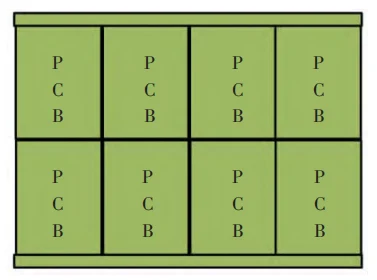
There are three types of panelization designs: longitudinal and transverse panelization, mirror panelization, and double-sided panelization.
Designers most commonly recommend using longitudinal and transverse panelization, with all boards oriented in the same direction.
They should ideally maintain the aspect ratio of the panelized layout at 3:2 or 4:3, as shown in Figure 1.
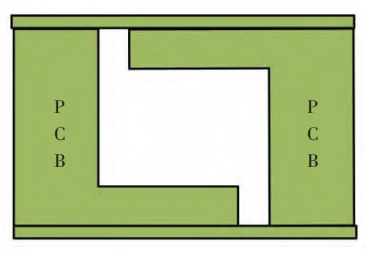
Designers use mirror panelization primarily for irregularly shaped PCBs.
In this method, designers place one side of the irregular shape opposite the center to create a regular shape after panelization, as shown in Figure 2.
Front-to-back panelization is primarily used for designs with surface-mount components on both sides of the PCB.
This approach is suitable when all components meet the requirements for passing through-hole reflow soldering on the back side.
Front-to-back panelization must ensure symmetrical distribution of positive and negative layers in the PCB photoplotting file.
Its advantage is that the front and back sides are completely identical, allowing for the use of a single stencil.
When using front-to-back panelization, the reference marks (Marks) on the process edges must align after flipping, as shown in Figure 3.

When designing panel layouts, it is necessary to consider PCBA separation.
Panel separation slots must possess sufficient mechanical strength and facilitate easy PCBA separation.
There are four common types of separation slot designs: V-grooves, bridges, stamp holes, and composite connections.
Among these, V-grooves are the most commonly used separation design. The groove angles for V-grooves typically range from 30° to 45°.
The bridge connection method is suitable for connecting irregularly shaped boards.
However, it presents challenges, including difficulty in separation and significant residue.
Therefore, it is best used in conjunction with a dedicated panel saw.
Post holes are generally used for PCBs with a thickness of less than 1 mm.
Designers typically use composite connections to connect boards of different shapes.
They can adopt different separation designs at different connection points as needed.
Component Selection
Component selection must be a key focus of PCB design.
When selecting components, designers must consider factors such as operating temperature, operating voltage range, operating current range, thermal power dissipation, and package type.
Component selection directly determines the complexity of the manufacturing and debugging processes for the PCBA.
For PCBA manufacturing, the simpler the process, the higher the yield rate and the greater the debugging efficiency.
To improve PCB manufacturability and testability, designers should prioritize the use of surface-mount devices (SMDs).
For SMDs, select components with external leads whenever possible, and prefer tape-and-reel packaging to facilitate automated placement, inspection, and rework.
Designers should avoid heavy components whenever possible.
If they must use heavier components due to power requirements or packaging constraints, they should incorporate reinforcement measures into the PCB design.
Minimize the variety of components to simplify procurement and inventory management.
Resistors and capacitors of the same specification should ideally use the same package type.
Determine the lead length of through-hole components based on the PCB board thickness; generally, through-hole components should protrude at least 0.5 mm above the board surface.
To facilitate PCBA debugging, designers should use standard-package components for program carriers.
This allows them to perform pre-programming using a programmer.
Component Placement
Component placement affects soldering quality and efficiency, and also has a significant impact on inspection and repair.
Designers should distribute components as evenly as possible, maintaining a balanced density.
High-mass components have a large thermal capacity during reflow soldering. If they are too concentrated, local temperatures can drop, resulting in cold solder joints.
Even placement also helps designers balance the center of gravity.
This reduces the likelihood that components, metallized holes, and pads will be pulled apart during vibration or impact.
To prevent incorrect polarity soldering, designers should arrange components of the same type in the same direction whenever possible.
Their orientation should be consistent. This facilitates component placement, soldering, and inspection.
Examples include electrolytic capacitors, diodes, transistors, and surface-mount ICs.
Designers should place heat-generating components as far away from other components as possible.
They typically position these components in corners or well-ventilated areas within the device.
Designers must maintain a minimum distance of 2 mm from the PCB surface.
Designers should place heat-sensitive components as far as possible from heat-generating components.
Designers should avoid placing any components within a 3 mm radius of the front or back edges of crimp connectors.
Designers should preferably avoid placing BGA components in the center of the PCB.
Additionally, designers should avoid placing any bottom-soldered components within a 3 mm radius of BGA components.
To prevent solder joint failure due to PCB warping, the spacing between adjacent BGA components should be no less than 5mm.
For designs with BGAs on both the A and B sides, designers must avoid placing BGAs symmetrically on the two sides.
The long axis of chip components should be perpendicular to the direction of the reflow soldering conveyor belt. This helps ensure better heat distribution during the soldering process.
The long axis of SMD components should be parallel to the long edge of the PCB.
This arrangement promotes optimal thermal convection during reflow soldering.
Together, these orientations help improve the overall quality of solder joints.
The area within 5 mm of the edges of mounting holes is a high-stress zone; placing components in this area may cause them to experience stress and result in solder joint failure.
Metal-cased components (such as crystals, filters, modules, and aviation connectors) must not come into contact with printed traces.
When assembling components near printed traces, designers must include insulating spacers to provide isolation.
Designers should route centralized test interfaces and external interfaces along the board edges whenever possible.
This facilitates cable insertion, removal, and assembly.
Depending on the chassis structure, designers may choose either vertical or horizontal mounting.
Component Package Design
Pad design is closely related to the surface mount process.
Pad design must match the component dimensions, accommodate slight variations among components from different manufacturers, and meet routing requirements to the greatest extent possible.
Designers must ensure that component silkscreen markings are accurate.
For BGA-type components, the silkscreen outline must remain clearly visible after mounting on the PCB.
They must also ensure that component polarity markings are accurate.
Components with polarity or directional requirements should be marked to prevent placement errors.
Additionally, designers should place polarity and directional markings outside the silkscreen outline whenever possible.
Pad design should adhere to the standards for each component type, as the quality of pad design directly affects soldering success rates.
If designers make pads too large, components may shift or pins may short-circuit.
If they make pads too small, it can result in cold solder joints or poor soldering.
Design of Test Points and Test Interfaces
Designers must reserve test points and test interfaces for PCBA debugging.
They should arrange them in rows and columns whenever possible. This facilitates the design of dedicated test fixtures.
The recommended design for test points and test interfaces is shown in Figure 4, with test points or test interfaces arranged in a concentrated layout, preferably spaced at 2.0 mm or 2.5 mm.

PCB Routing
The routing rules for PCB design must first and foremost meet the requirements of electrical performance, with traces kept as short as possible.
An exception to this rule applies to high-frequency circuits where special trace extensions are necessary to achieve impedance matching (e.g., serpentine routing).
Select the width and thickness of copper traces based on the circuit’s current-carrying capacity, while taking electromagnetic compatibility into account.
Designers should use rounded or chamfered corners for trace turns.
They must strictly avoid sharp or right-angle corners.
Traces on adjacent layers should be perpendicular to each other, and choose between single-point and multi-point grounding appropriately.
If designers use single-point grounding, they must ensure that the length of the ground trace does not exceed 1/20 of the wavelength.
If it does, they should employ multi-point grounding instead.
If a circuit board contains both digital and analog circuits, designers should separate the two types of circuits as much as possible.
They must strictly distinguish between digital ground and analog ground.
To improve noise immunity and prevent ground potential from fluctuating with current changes, ground traces should be made as thick as possible.
Connect a 10–100 μF electrolytic capacitor across the power supply input to enhance noise immunity.
For chips with weak noise immunity or significant power supply fluctuations during shutdown—such as RAM and ROM memory devices—designers should connect a decoupling capacitor directly between the power supply and ground.
Capacitor leads should be kept as short as possible; in particular, high-frequency bypass capacitors should have no leads.
Signal traces on the PCB should remain on the same layer whenever possible.
This helps minimize the use of unnecessary vias.
Designers should place vias for power and ground pins as close to the pins as possible.
The connecting traces between the via and the pin should also be as short as possible.
Designers should place ground vias near signal layer-changing vias. This provides the nearest return path for the signal.
They should place clock devices as close as possible to the components that use them. Clock lines should be kept as short as possible, and the clock area may be grounded. Designers should avoid routing traces beneath oscillators and crystals.
Designers should place I/O driver circuits as close as possible to the board edge. This improves signal integrity and reduces routing complexity.
They must connect unused MCU pins to VDD or GND, or define them as outputs to ensure stable behavior.
Designers must connect all power and ground pins on integrated circuits.
They must not be left floating to avoid unstable operation.
PCB Design for Testability
① Program Programming Design.
PCBA debugging is closely related to PCB design; therefore, ease of debugging must be considered during the PCB design phase.
Functional components that support offline programming should be prioritized to allow for programming before soldering.
If offline programming of functional components is difficult, a programming socket should be provided.
This allows safe and convenient programming.The socket must include reverse-protection.
This ensures that the programmer does not damage the component if inserted in the wrong direction during programming.
Designers should avoid placing surface-mount components, such as electrolytic capacitors, within 0.5 mm of the programming socket.
This prevents interference during programmer insertion and removal.
② Functional and Performance Debugging.
Designers must consider functional and performance testing of the PCBA during PCB design.
They should reserve key signal test points and test interfaces, and design debugging fixtures simultaneously.
During mass production, these fixtures allow electrical characteristic and functional tests on the PCBA via the test points or interfaces. Designers should prioritize BIT testing.
③ Fault Resolution.
A manual of corresponding resolution methods should be created for common product fault codes to facilitate quick lookup and repair.
Faults should also be recorded to facilitate problem statistics and collection, leading to the development of improvement measures and a gradual increase in product yield.
System Assembly Design
When designing a product, it is essential to consider the efficiency and reliability of PCBA assembly within the final system.
To ensure assembly efficiency and reliability, the chassis design should ideally include PCBA positioning features.
Designers should prioritize using screws of the same specification to secure the PCBA.
For interconnections within the chassis, they should use flexible ribbon cables or cable assemblies. Designers should avoid rigid connections between PCBs.
Increased manufacturing tolerances in the chassis may cause the PCBA to warp or deform, thereby compromising product reliability.
PCBA Process Design
Stencil Design
Designers must treat the stencil as a critical piece of equipment in the SMT soldering process.
They should design it according to the specific project, primarily considering the following aspects:
① Stencil Material.
Typically, stainless steel sheets are used to manufacture stencils, with a thickness of 0.1–0.3 mm.
② Stencil Positioning.
Generally, the center of the PCB, the center of the stencil, and the center of the stencil’s outer frame must align.
③ Marking Content.
Designers should place the stencil marking in the lower right corner of the stencil’s top surface.
They may specify the font and text size according to company requirements, but the marking must be clear and easily recognizable.
④ Stencil Thickness and Manufacturing Process.
Designers should select the stencil thickness based on the PCB’s minimum pitch value.
They should choose corresponding stencil materials and manufacturing processes accordingly.
Specific requirements are detailed in Table 1.
⑤ Stencil aperture design.
Stencil aperture design must comply with aspect ratio and area ratio requirements, as follows:
Aspect ratio = aperture width / stencil thickness; aspect ratio > 1.5;
Area ratio = aperture area / aperture wall area; area ratio > 2/3;
The PCB must be centered, with tension at the four corners and center ≥ 45 N/cm.
⑥ Aperture design.
CHIP-type components: 0603 and larger generally use V-shaped openings; for 0402, the stencil opening is designed in a 1:1 relationship with the pad;
SOT23, SOT89, and SOT143 package openings are designed in a 1:1 relationship with the pads;
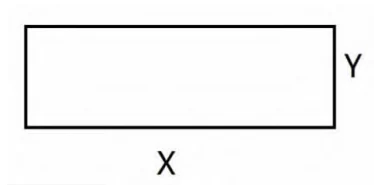
SOJ, QFP, PLCC, and other IC opening designs are as shown in Figure 5;
For X-direction openings with a pitch of ≤0.65 mm, the opening-to-pad ratio is 1:1. This ensures proper solder paste deposition.
The Y-direction opening is determined based on the pitch value. For a pitch of 0.65 mm, the Y-direction opening is 0.32 mm.
For a pitch of 0.5 mm, the Y-direction opening is 0.235 mm. For a pitch of 0.4 mm, the Y-direction opening is 0.18 mm.
表1
Soldering Curve Design
The correct temperature profile ensures soldering quality and product reliability.
Currently, all PCBA soldering involves lead-based soldering.
For different PCBs, it is essential to first determine the soldering temperature and recommended soldering curve for each component.
Through testing, establish the temperatures for the preheating zone, heat absorption zone, reflow zone, and cooling zone.
Designers should verify and adjust the heater settings. They should also check and optimize the conveyor belt speed.
Finally, determine and finalize all process parameters.
Testing Process Design
The PCBA testing process determines both the efficiency of product testing and the product yield rate.
When designing the testing process, it is necessary to determine whether the PCBA procedure involves programming first and then soldering, or soldering first and then programming.
Designers should prioritize programming before soldering, and they must coordinate this process with the PCB design phase.
The debugging process must clearly define the debugging items and tools. This helps ensure a structured and efficient workflow.
Designers should minimize software functional debugging whenever possible. They should place greater emphasis on hardware functional debugging.
This includes focusing on interfaces and conducting thorough performance testing.
Once designers determine these factors, they should allocate debugging steps and workstations to establish an assembly line–style debugging line.
Conclusion
The manufacturability of a PCBA depends on a variety of factors. This article focuses solely on two aspects: printed circuit board design and PCBA process design.
Designers can achieve optimal results only through close collaboration among hardware designers, software designers, and process engineers during the product design phase.
This collaboration helps ensure both standardized design and standardized manufacturing.
Such coordination guarantees that the PCBA has good manufacturability. It also supports efficient production.
As a result, designers can achieve high yield rates while keeping rework rates low.